
Appearance
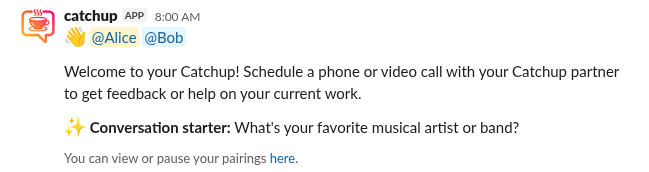
Conversation starters
How do I enable predefined conversation starters?
- Navigate to the Catchup Home tab in your workspace.
- Click Channel Settings and select Edit Participation Settings.
- Select On in the Conversation Starters dropdown menu.
View default conversation starters
- What's your favorite actor or actress?
- What's your favorite animal?
- What's your favorite board game or card game?
- What's your favorite book?
- What's your favorite city to visit?
- What's your favorite coffee shop?
- What's your favorite dessert?
- What's your favorite flower or plant?
- What's your favorite fruit?
- What's your favorite hobby?
- What's your favorite ice cream flavor?
- What's your favorite movie?
- What's your favorite musical artist or band?
- What's your favorite musical instrument?
- What's your favorite outdoor activity?
- What's your favorite piece of technology?
- What's your favorite pizza topping?
- What's your favorite place to go for a walk?
- What's your favorite restaurant?
- What's your favorite sport to watch or play?
- What's your favorite store?
- What's your favorite subject from school?
- What's your favorite thing to cook?
- What's your favorite thing to do on a rainy day?
- What's your favorite time of day?
- What's your favorite TV show?
- What's your favorite type of cuisine?
- What's your favorite type of landscape (mountains, beach, etc.)?
- What's your favorite type of music?
- What's your favorite type of vacation?
- What's your favorite type of weather?
- What's your favorite video game?
- What's your favorite way to learn something new?
- What's your favorite way to relax after work?
- What's your favorite way to spend a weekend?
How do I enable custom conversation starters?
- Navigate to the Catchup Home tab in your workspace.
- Click Channel Settings and select Edit Participation Settings.
- Select On in the Conversation Starters dropdown menu.
- Click Manage.
- Click Add.
- Add your own custom conversation starters. Each line will be converted to a conversation starter.
- Click Save.
How do I disable custom conversation starters?
- Navigate to the Catchup Home tab in your workspace.
- Click Channel Settings and select Edit Participation Settings.
- Click Manage.
- Click Edit.
- Click ✖️ Clear input
- Click Save.
Calendar integration
If a Catchup with conversation starters also has the calendar integration enabled, then the calendar invite will contain the conversation starter in the description.